
One common problem users face is being unable to access certain websites even when using a proxy. Proxies stop working because anti-fraud systems detect and block them. In most cases, the problem is that the DNS servers provided by the proxy do not match the user's IP address or other connection parameters.
Why does this happen? How can you stop wasting money on proxies and VPNs that simply don't work? And, more importantly, what can you do about it?
We found the answer in our ZloyTeam research laboratory.
Table of Contents
- Why Does a Proxy Provide Its Own DNS?
- We Know the Secret to Perfect DNS
- Technical Terms, Simply Explained
- The Problem: Native DNS Servers Are Not Always Easy to Find
- How Is This Problem Usually Solved, and Why Is That a Bad Approach?
- How Does ZloyRouter Speed Up Website Loading?
- ZloyRouter Solves the Problem of Finding Native DNS Servers
- Glossary
Why Does a Proxy Provide Its Own DNS?
Let's start by looking at how proxy users obtain their DNS settings.
Most users never even think about which DNS servers they should use. They simply click the "Connect" button and consider the job done. As a result, they use whatever DNS servers their proxy provider supplies, without making any additional configuration changes.
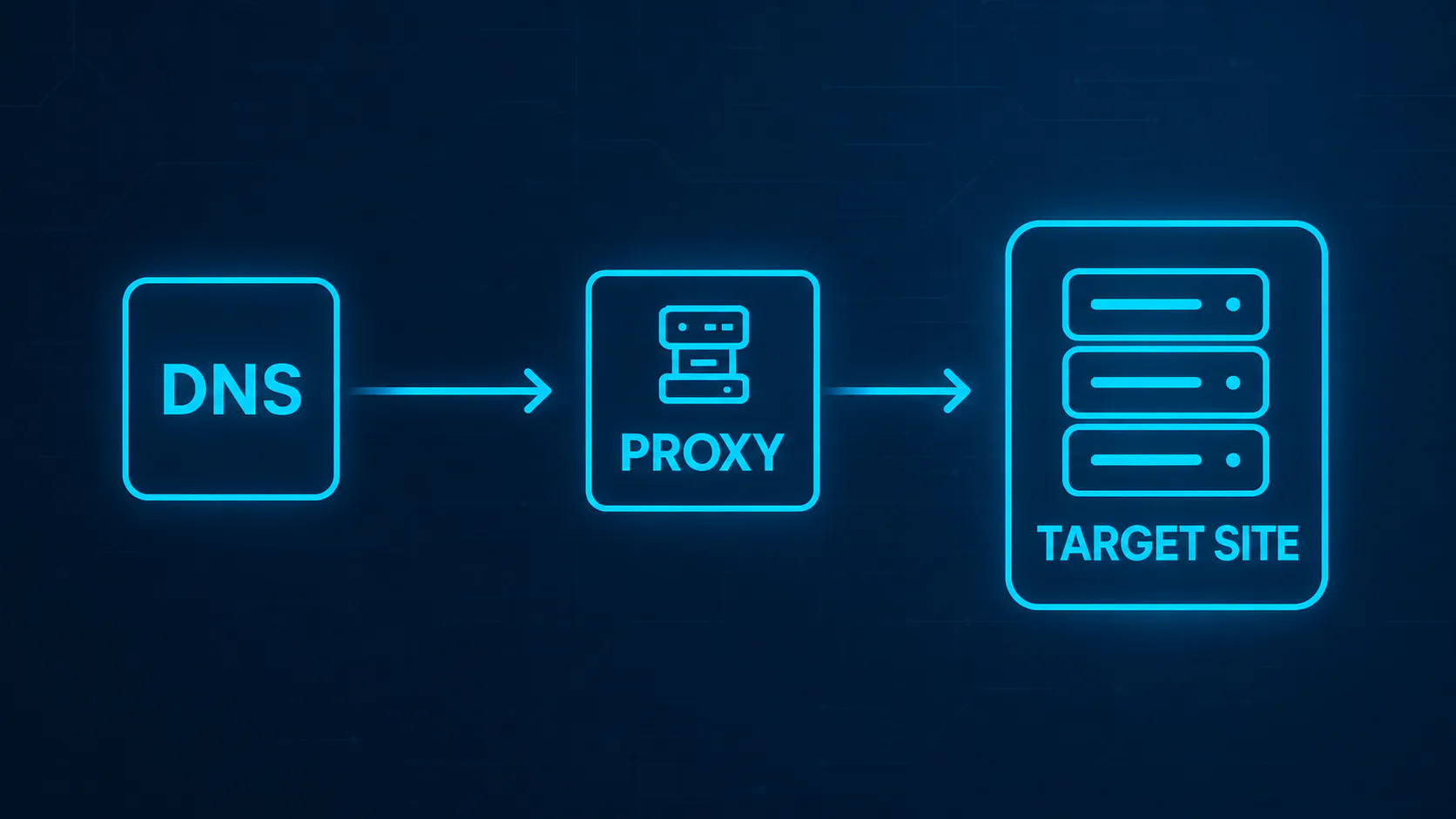
This behavior is quite typical of ordinary Internet users:
-
According to a 2023 study of browser user behavior, more than 70% of users keep their browser settings at their default values:
"Users typically had the default settings enabled in their own browsers.(...) More than 70% of participants continued to use the default encrypted DNS settings."
-
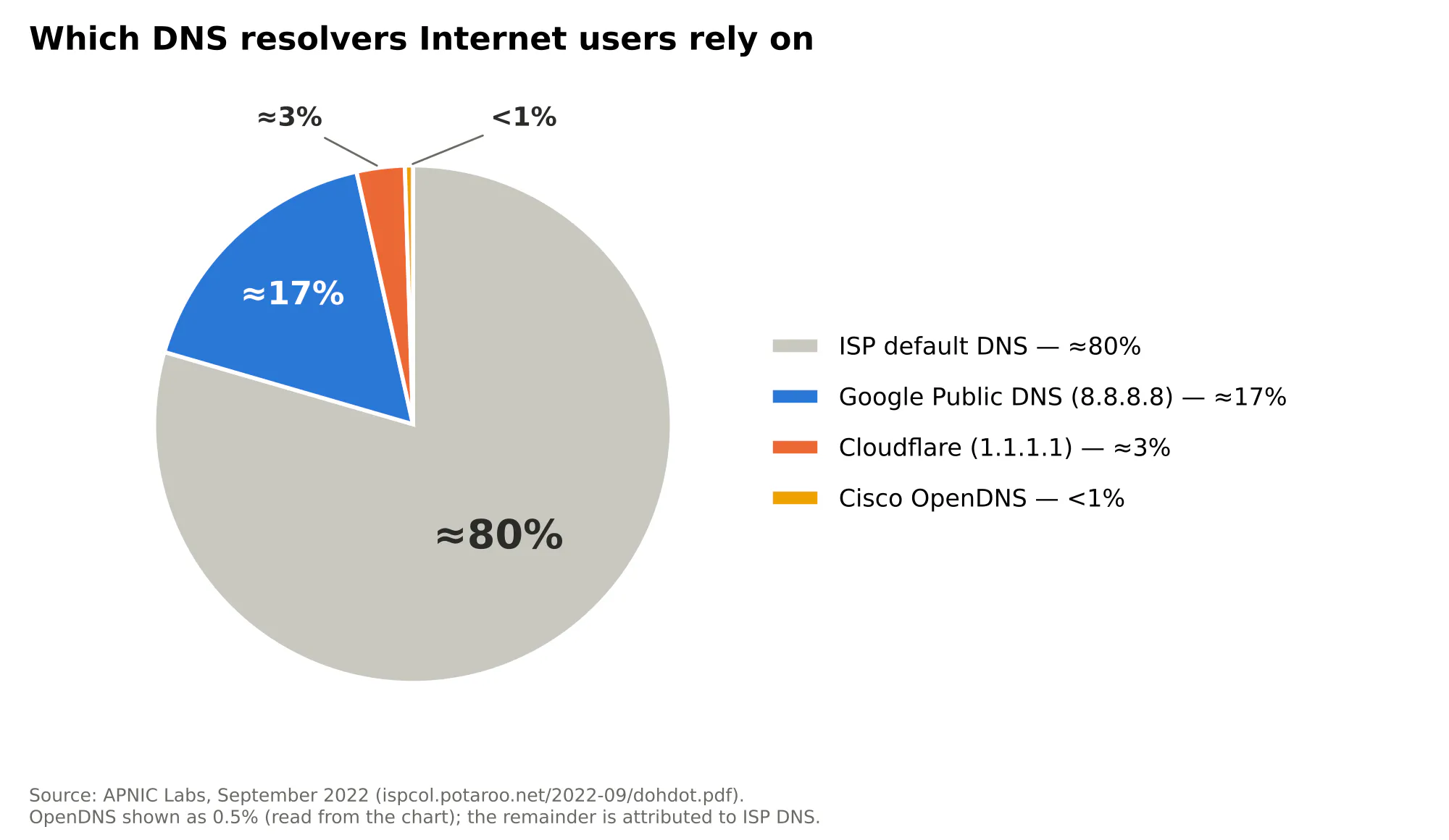
According to APNIC Labs research from 2022, approximately 80% of Internet users rely on default DNS servers provided by their ISPs. The remaining 23% use other services: Google Public DNS accounts for approximately 17%, Cloudflare DNS for around 3%, and Cisco's DNS service for less than 1%.
"Some two thirds of the Internet’s user base use the default DNS resolution service provided as part of their local ISP’s access service. (...) Cloudflare’s DNS service is used by some 3% of the user base. (...) An estimated 17% of users currently have their queries passed to Google’s 8.8.8.8 resolver, 3% to Cloudflare’s 1.1.1.1 service and under 1% to Cisco’s Open DNS service."
Unfortunately, many proxy providers simply don't bother providing their customers with native DNS. In many cases, they don't even understand what native DNS should look like. This is one of the main problems users bring to us.
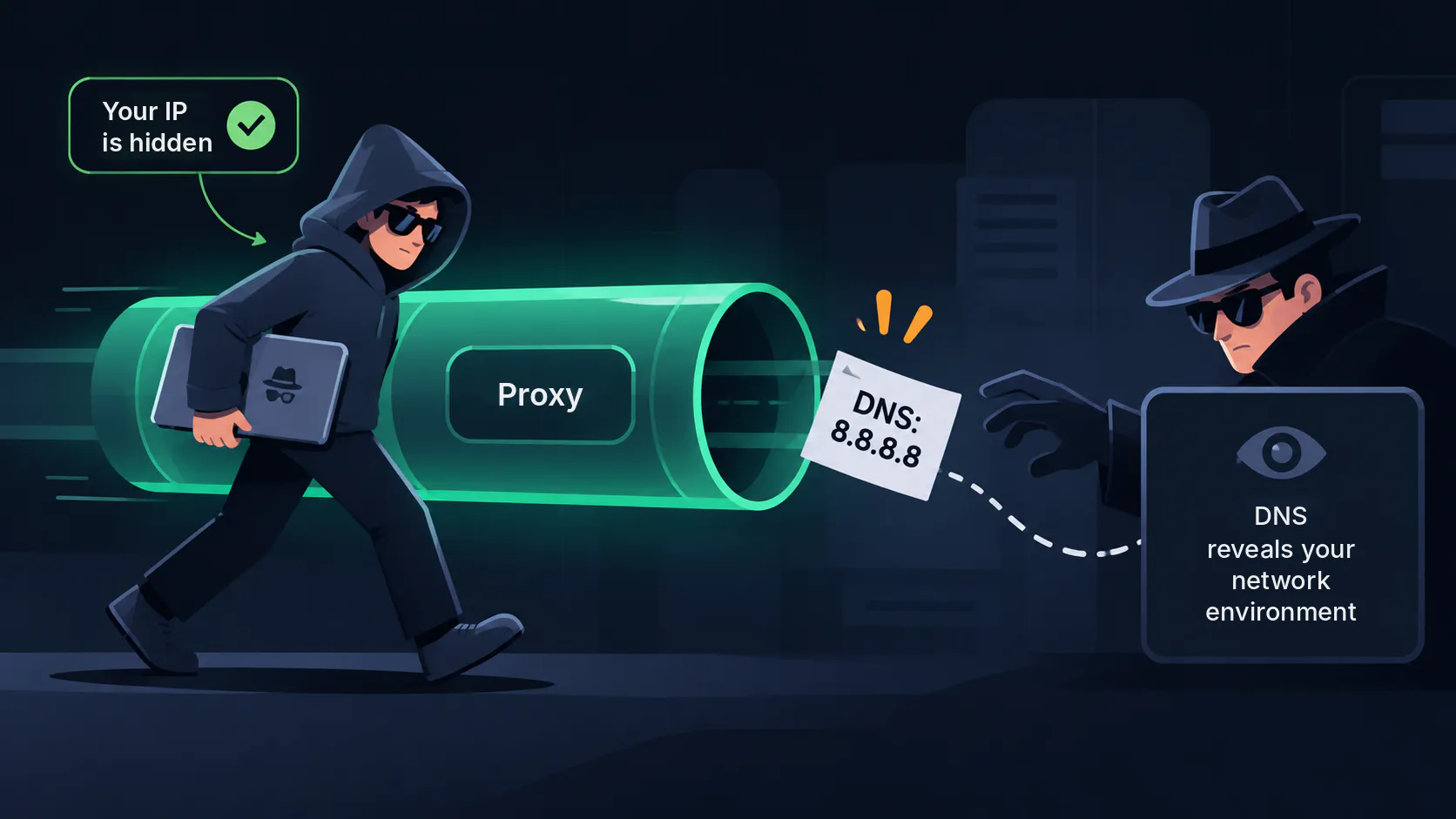
If a DNS server is not native, meaning it does not match the geolocation of the user's IP address, anti-fraud systems can detect that the connection is being masked. This is known as a DNS leak.
This is one of the main reasons a proxy or VPN fails to protect you.
We'll explain exactly how this happens in more detail in our next article. Subscribe to our updates so you don't miss it!
What Can You Do to Bypass These Restrictions?
To appear as a legitimate US-based user to anti-fraud systems, you need, at the very least, to replace the DNS servers supplied by your proxy provider with ones that look natural alongside your IP address.
In other words:
US IP address + DNS servers belonging to a US ISP operating in the same location.
By location, we mean a specific state or, ideally, a city and its metropolitan area.
However, finding suitable DNS servers is not that easy. It can take weeks of searching through Google, ISP websites, and specialized forums, with no guarantee of success.
Some major international mobile and residential ISPs don't even have a single set of publicly available DNS servers.
Check your DNS settings using our DNS checker:

We Know the Secret to Perfect DNS
Today, we're going to explain how ZloyRouter selects DNS servers that look perfectly native. We'll also show you how to achieve a 100% Clean result when testing your proxy with our DNS checker, meaning that your connection fully matches the profile of a residential US ISP user.
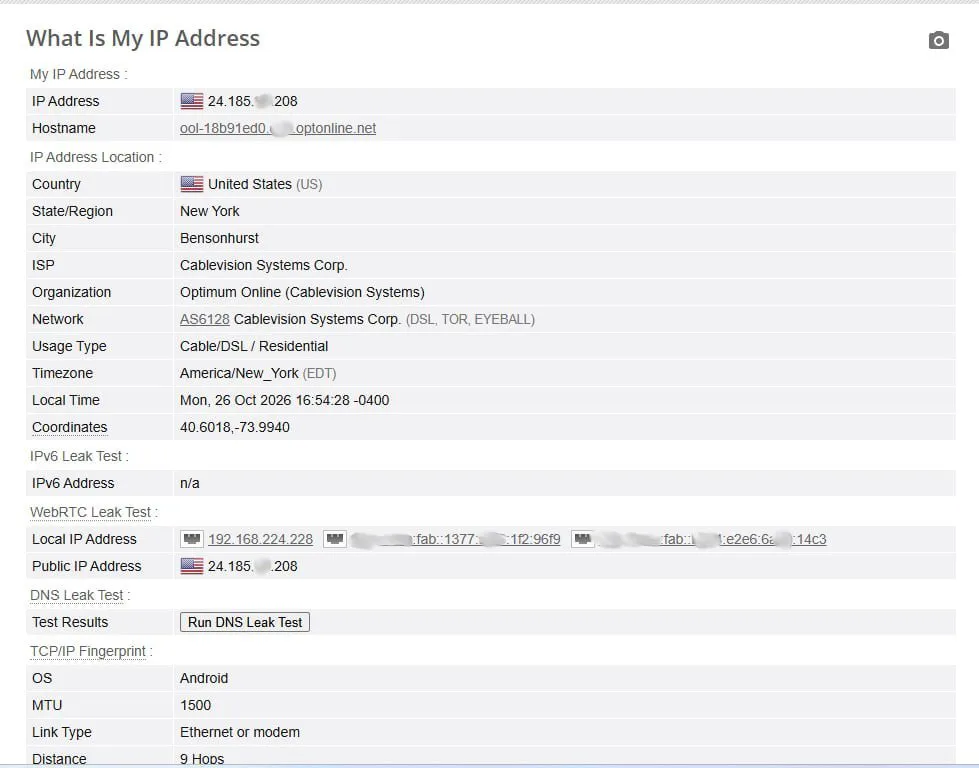
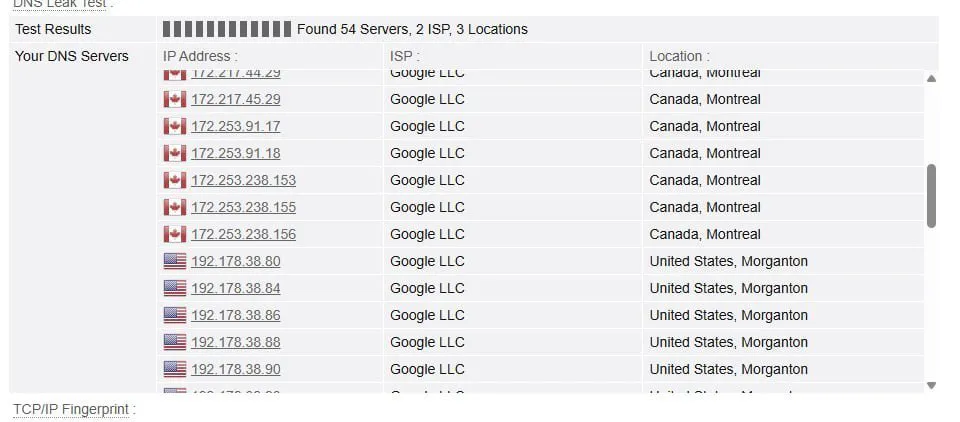
Case study: We tested a proxy configured with DNS servers selected by ZloyRouter using our own DNS checker, then independently checked the same proxy with BrowserLeaks, using exactly the same IP address. The screenshots were kindly provided by one of our customers.
Initially, the customer was using a competitor's anonymity software together with a proxy. However, anti-fraud systems kept detecting the connection and rejecting requests.
Trying to figure out what was going wrong, the customer tested the proxy using our DNS checker and contacted us. We then conducted several tests together and obtained some very interesting results. To make the comparison more objective, we also checked the proxy using BrowserLeaks.
Here is the first test: the proxy was used with a competitor's software. As you can see, both our DNS checker and BrowserLeaks detect the problem. The last screenshot clearly shows that the competing service assigns Canadian DNS servers to a proxy with a US IP address.
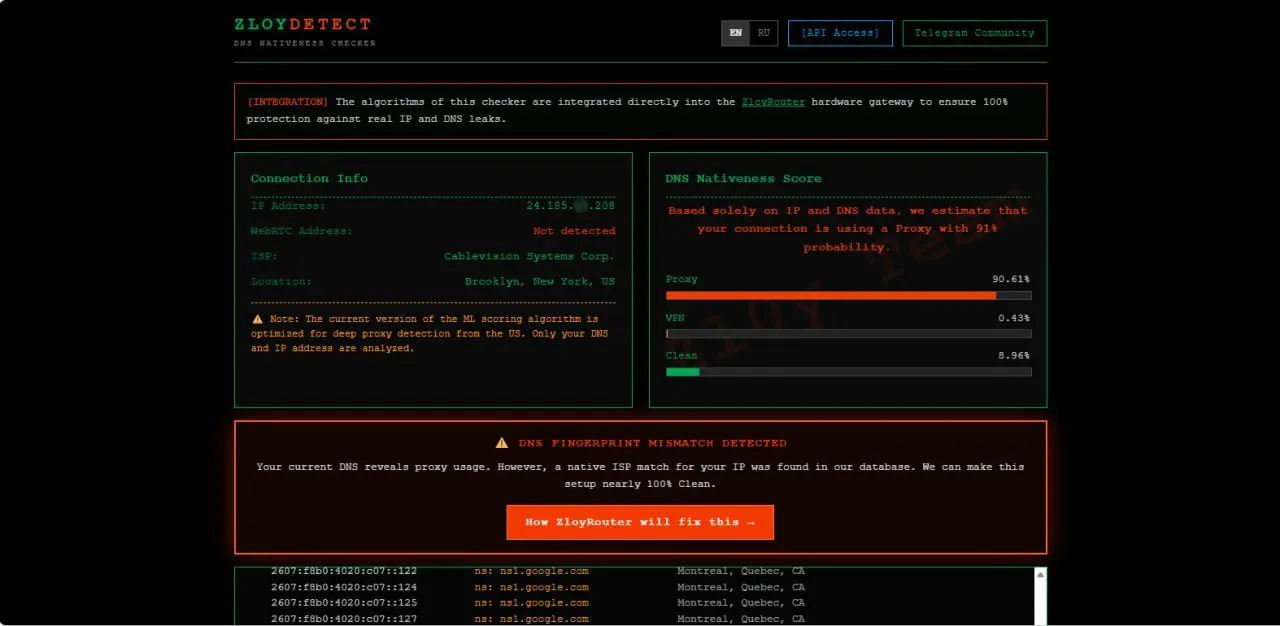
 Next, we tested the exact same proxy using ZloyRouter.
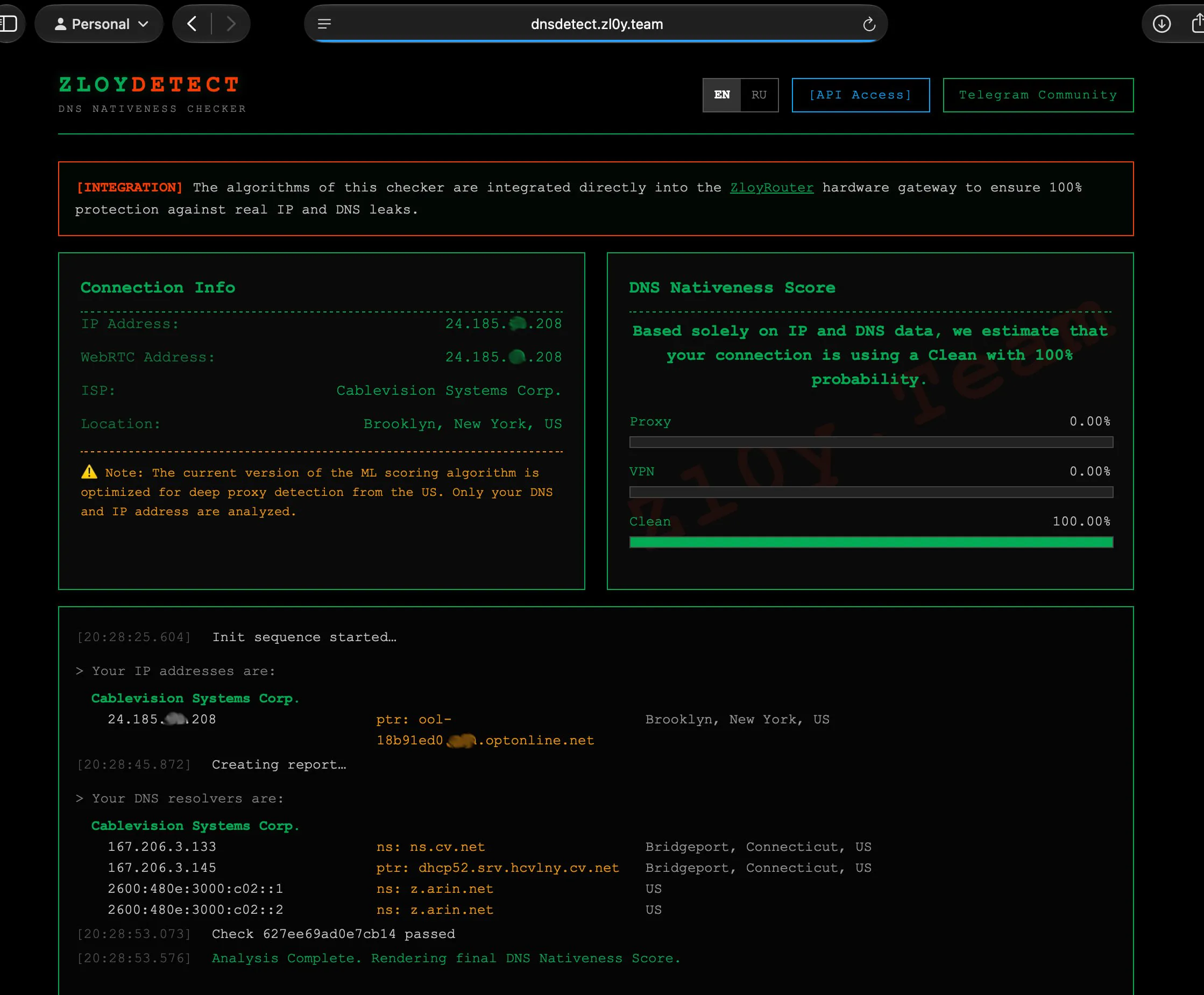
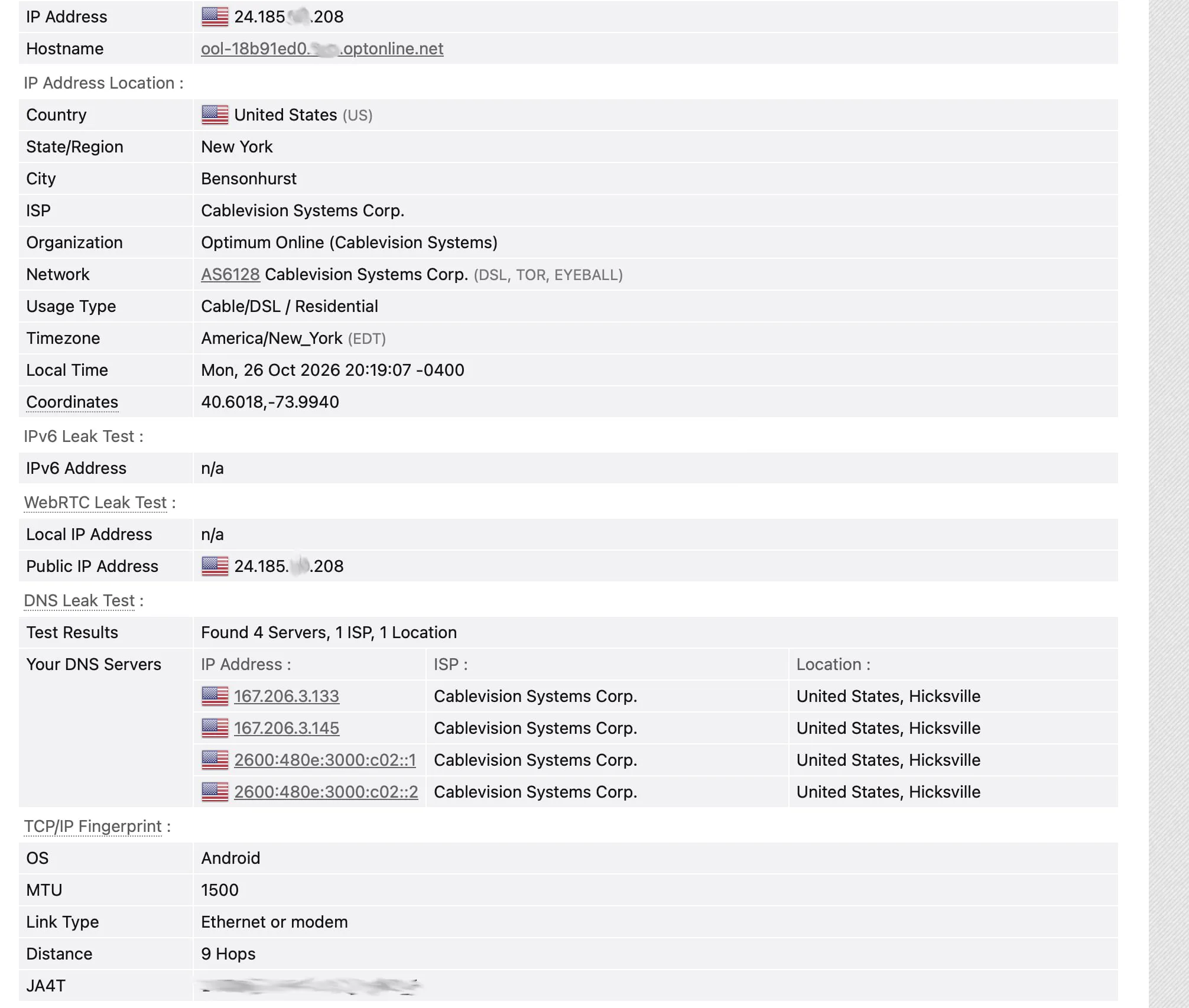
As you can see, the user's connection now looks 100% native. The DNS Nativeness Score is 100%.
The location is Brooklyn, New York, and it fully matches both the IP address and the DNS resolver: Cablevision System Corp., which actually has a data center in Brooklyn.
No DNS leaks!
 This case clearly demonstrates that, to anti-fraud systems used by international websites, ZloyRouter users look like genuine American residential Internet users.
How Do We Achieve This?
- First, we have an extensive proprietary digital database of user connections and behavioral patterns, which we have been collecting for years. We can analyze this vast amount of data in our research laboratory, test hypotheses, and identify patterns.
- Second, we have developed WunderDNS, our proprietary algorithm for selecting native DNS servers.
- And finally, here's our most interesting recent discovery: accessing local IP addresses within the networks of major ISPs, which allows us to locate and use their DNS servers for proxy connections.
Technical Terms, Simply Explained
To make things clear even for readers who aren't familiar with networking technologies but simply want to solve their website access problems, let's take a closer look at how all of this works.
Public and Local IP Addresses
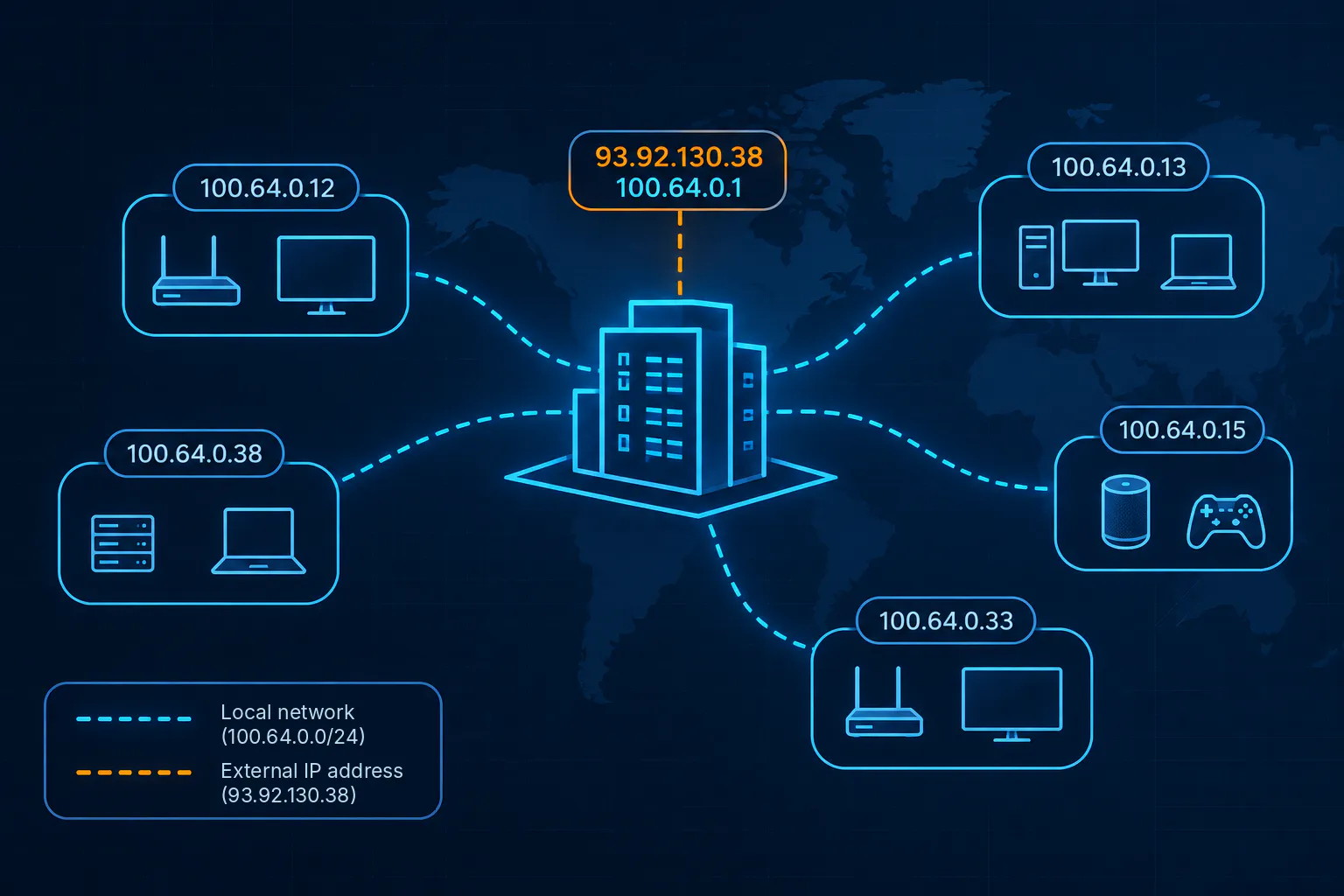
An ISP may operate a large, distributed local network connecting thousands of customers, such as residents of an apartment building.
All these customers may share a single public IP address, which provides access to the global Internet through a gateway. At the same time, each customer has their own internal IP address.
These internal, or local, IP addresses belong to a special address range and are not routable across the public Internet.
The Problem: Native DNS Servers Are Not Always Easy to Find
To make a network environment look native, people usually search for publicly accessible DNS servers belonging to ISPs in the required region.
For example, if we want to appear as a user from the United States, we look for DNS servers belonging to American ISPs. We covered this process in detail in our article about DNS selection.
However, problems can arise right at this stage: some ISPs simply don't have publicly accessible DNS servers for particular regions.
Some providers only make their DNS servers available through DHCP, meaning they are accessible only within the provider's local network. Examples include major US providers such as Verizon, T-Mobile, Pennsylvania Telecom, and Armstrong.
These providers do not expose a public IP address that can be queried to obtain their DNS servers. They operate enormous, complex infrastructures, with DNS servers hidden deep inside their networks and therefore inaccessible from the outside.
How Is This Problem Usually Solved, and Why Is That a Bad Approach?
One way to address DNS leaks is to use SOCKS5H: send a request through the proxy, obtain DNS resolution remotely, and everything should work. This is how other router firmware solutions and anti-detect browsers operate. However, this approach introduces two additional problems that are not so easy to solve:
- Incorrect DNS servers. When using SOCKS5H, you may receive DNS servers that do not match your geolocation. This can result in DNS leaks and subsequent blocking.
- Low connection speed. SOCKS5H can be extremely slow. It has no local cache, which significantly increases connection latency. Every time you need to resolve a domain, you have to send a request through SOCKS5H and wait for the response to travel all the way between your PC and a remote server somewhere overseas.
And if you're visiting a heavy website with hundreds of pages and subdomains, such as Amazon.com, you might end up waiting for what feels like an eternity.
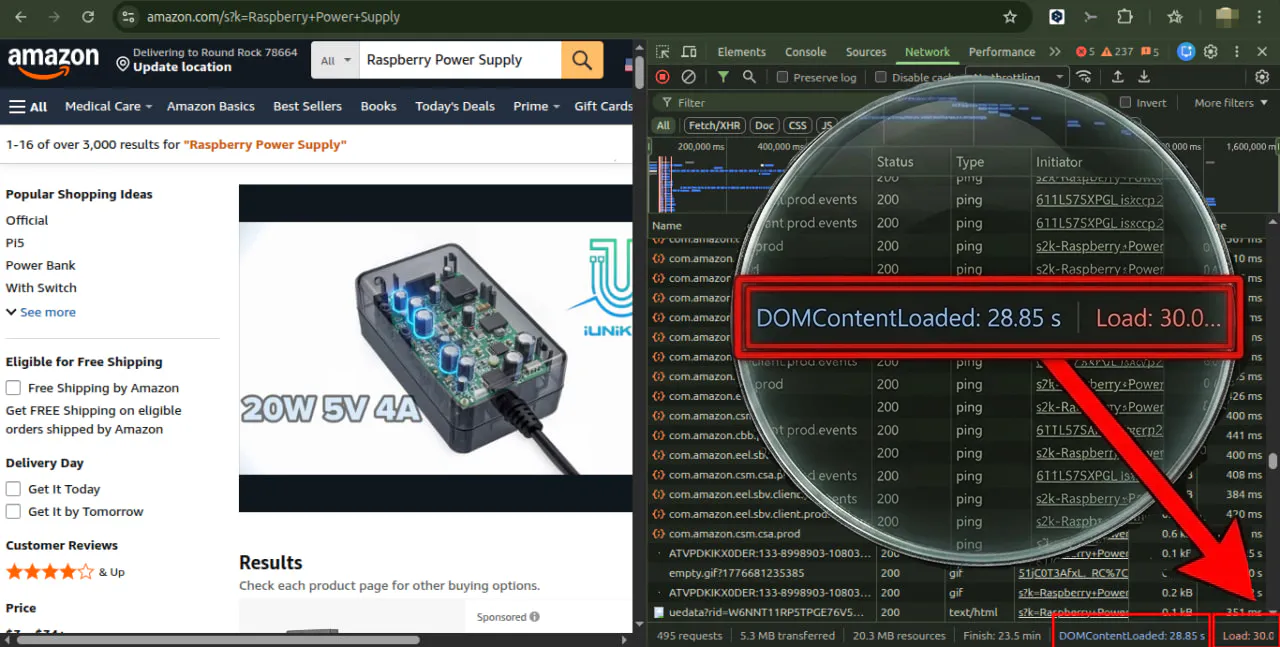
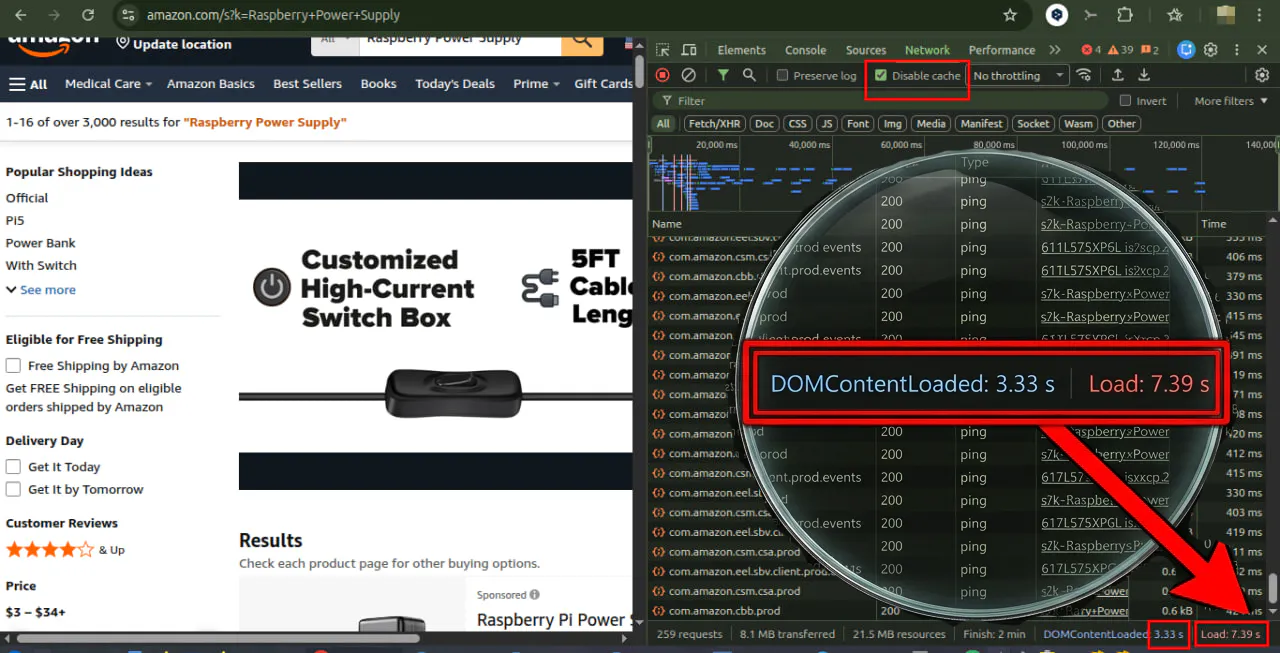
Here's a comparison from the ZloyRouter configuration documentation. It shows the time required to load Amazon.com using a conventional setup versus ZloyRouter with local caching.
1. Loading with a conventional setup: 30 seconds
2. Loading with ZloyRouter: 3.33 seconds
How Does ZloyRouter Speed Up Website Loading?
Imagine you're participating in a rally, and DNS is your navigator. They tell you which way to turn at exactly the right moment, and you steer accordingly without having to think too much about it.
Using SOCKS5H is roughly like having your navigator sitting on another continent, giving you instructions over a laggy Skype connection. You're racing at full speed, approaching a sharp turn, and need to turn the wheel immediately. But all you hear through the speakers is horrible static and a barely audible: "Hello? Can you hear me?" Sounds like a nightmare, doesn't it?
Now imagine using a device with a local cache. Your co-driver is sitting right next to you, understanding every instruction instantly, sometimes even with just a glance.
That's exactly how ZloyRouter works. It literally sits in your car (installed on your Raspberry Pi), caches DNS requests, and saves you time.
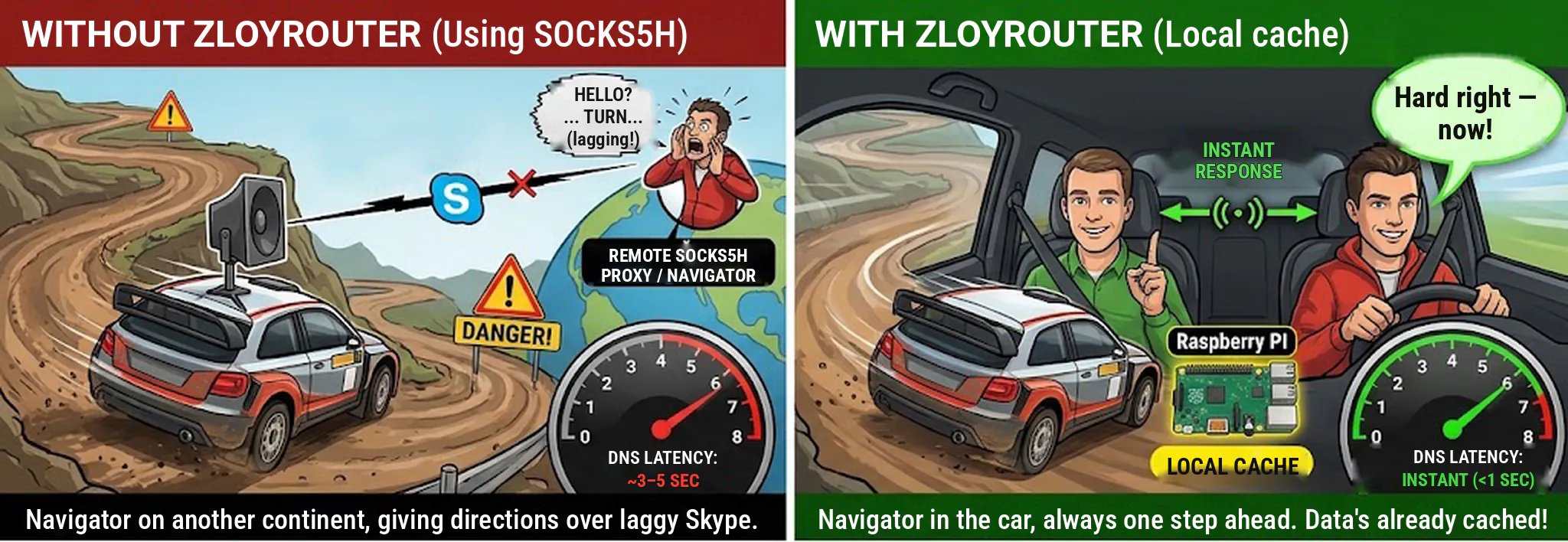
With ZloyRouter, you can load even heavy websites like Amazon.com, with hundreds of subdomains, up to dozens of times faster (3 seconds instead of 30!).
Why? Because the data required for loading is already stored in your device's cache.
ZloyRouter Solves the Problem of Finding Native DNS Servers
Our team conducted extensive research and discovered what is essentially a backdoor into the infrastructure of US residential ISPs.
Here's how it works:
To obtain native ISP DNS servers, we don't access the external Internet. Instead, we connect to the proxy's internal "home" router, using an IP address within its local network.
This home router, belonging to a subscriber of a US ISP, assumes that we are simply another device on the residential network. It then provides us with the native DNS servers assigned by the ISP.
We configure the connection to use these DNS servers, and anti-fraud systems see us as legitimate users from the United States.
There is nothing left to reveal that the connection is masked!
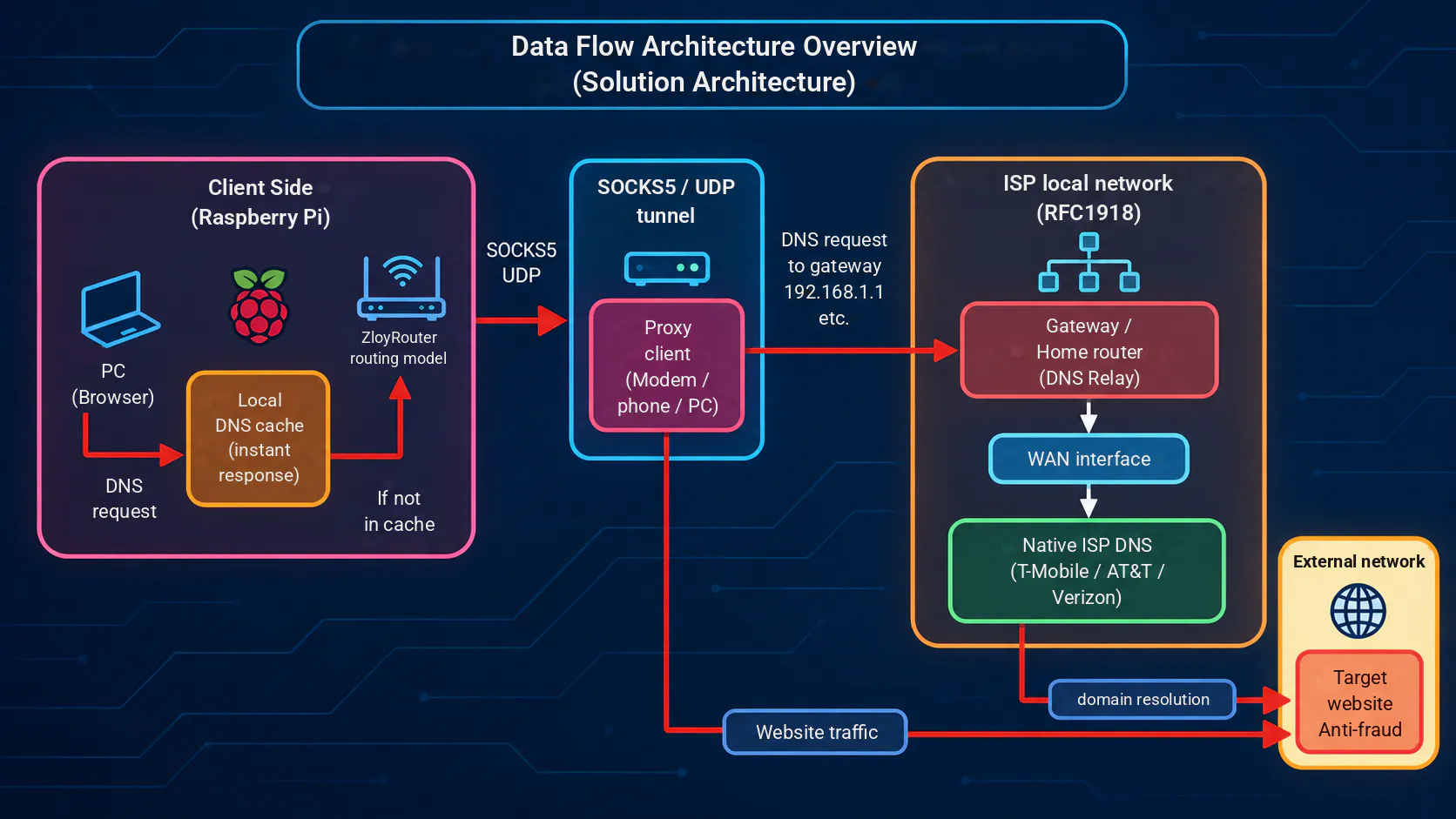
Performing this procedure manually is extremely difficult:
- The gateway address is not known in advance.
- Native DNS servers are not publicly accessible for proxy connections.
- Ordinary browser JavaScript cannot directly send arbitrary DNS queries over UDP.
Working with DNS at the network level requires a system-level or specialized networking tool.
ZloyRouter is exactly that tool. It handles all the complicated work for you. Performing this procedure manually is practically impossible!
ZloyRouter Effectively Solves These Problems:
- Our proprietary database of digital user connection data, combined with a research laboratory where we analyze how genuine residential users in the US and Europe behave.
- WunderDNS: our automatic DNS selection technology, backed by our own DNS database that helps us determine which DNS servers are appropriate for each ISP.
- Local DNS caching on Raspberry Pi, which increases connection speed, reduces the load on the proxy, and makes proxy connections faster and more reliable.
We can now confidently say that our technology is unique. We have carried out extensive research in our laboratory and built what is arguably the most comprehensive database of internal DNS information from major US ISPs in the world.
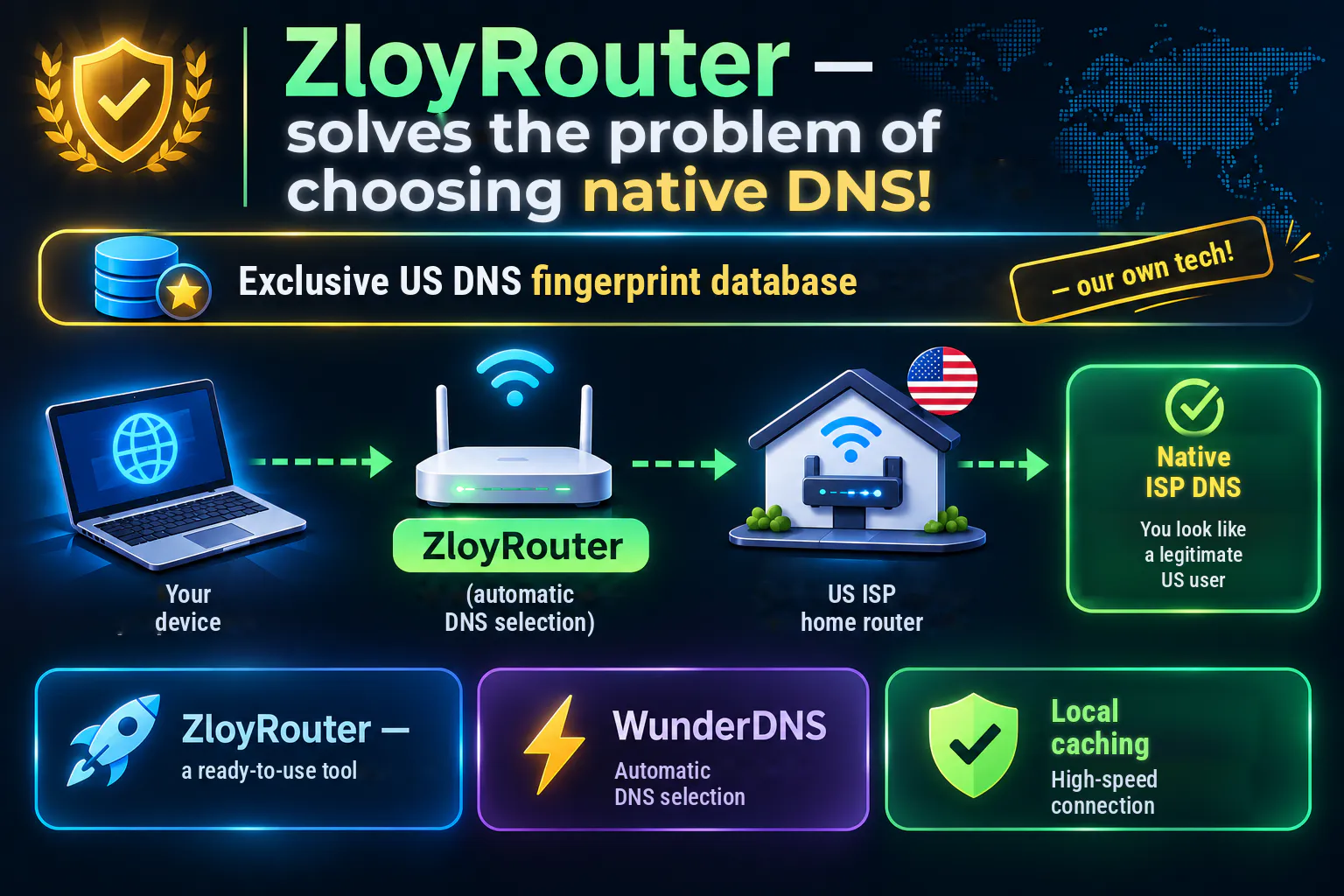
And there's more: you don't even need to explore this database or search through it yourself. The search functionality is already built into ZloyRouter. All you need to do is install it on your Raspberry Pi device, and its built-in algorithms will handle the rest.
ZloyRouter Can Do What Competitors Cannot
First, we have our proprietary WunderDNS technology, which builds these complex routes and sends requests to the right devices.
We don't rely on guesswork. We have our own research laboratory where we test different approaches and configurations.
We have millions of real user fingerprints that we have been collecting and analyzing for years! We use this real-world data to develop an ML model, conduct analyses, and test hypotheses to determine exactly what works and what doesn't.
This means we know exactly which DNS configurations look the most natural to anti-fraud systems, and we can select the right ones.
Another major advantage is our local cache. It solves the problem of declining connection speeds during extended use of the same proxy and when loading heavy websites such as Amazon.
No competing solution currently offers anything comparable, and it is unlikely that they will anytime soon.
ZloyRouter is software installed on your Raspberry Pi device. All cached data is stored locally on your device, allowing you to establish a fast and fully protected connection that anti-fraud systems cannot detect. DNS requests are cached separately for each proxy.
Why Not Just Use SOCKS5H? It's Simpler and More Accessible!
What would you rather take to the race of your dreams: a powerful modern race car with a pro navigator, or an old, rusty cart with a laggy connection? The answer is obvious.
Our technology delivers outstanding speed thanks to local caching. And ZloyRouter is your professional rally co-driver, plotting the route and helping you reach the finish line as quickly as possible!
How Does WunderDNS Test and Select Proxies?
What happens if access to local IP addresses is blocked? Does that mean our technology won't work? Not at all. We have a special feature for situations like this. ZloyRouter identifies such ISPs and avoids sending requests to them, saving your time and bandwidth. It also checks whether the proxy supports UDP. If it doesn't, ZloyRouter checks its database and provides a DoH configuration instead. This also helps protect against DNS interception.
You can learn more about how WunderDNS works in our documentation.
The result is always checked for DNS nativeness. This is essential for making your requests look completely natural to international websites, something ordinary VPNs cannot achieve.
Does It Really Work? How Can You Check?
Here's what you can do right now to verify that the technology works:
-
Test your proxy using ZloyDetect.
-
Read our other technical articles:
If you have any questions, contact us. We'll be happy to help!