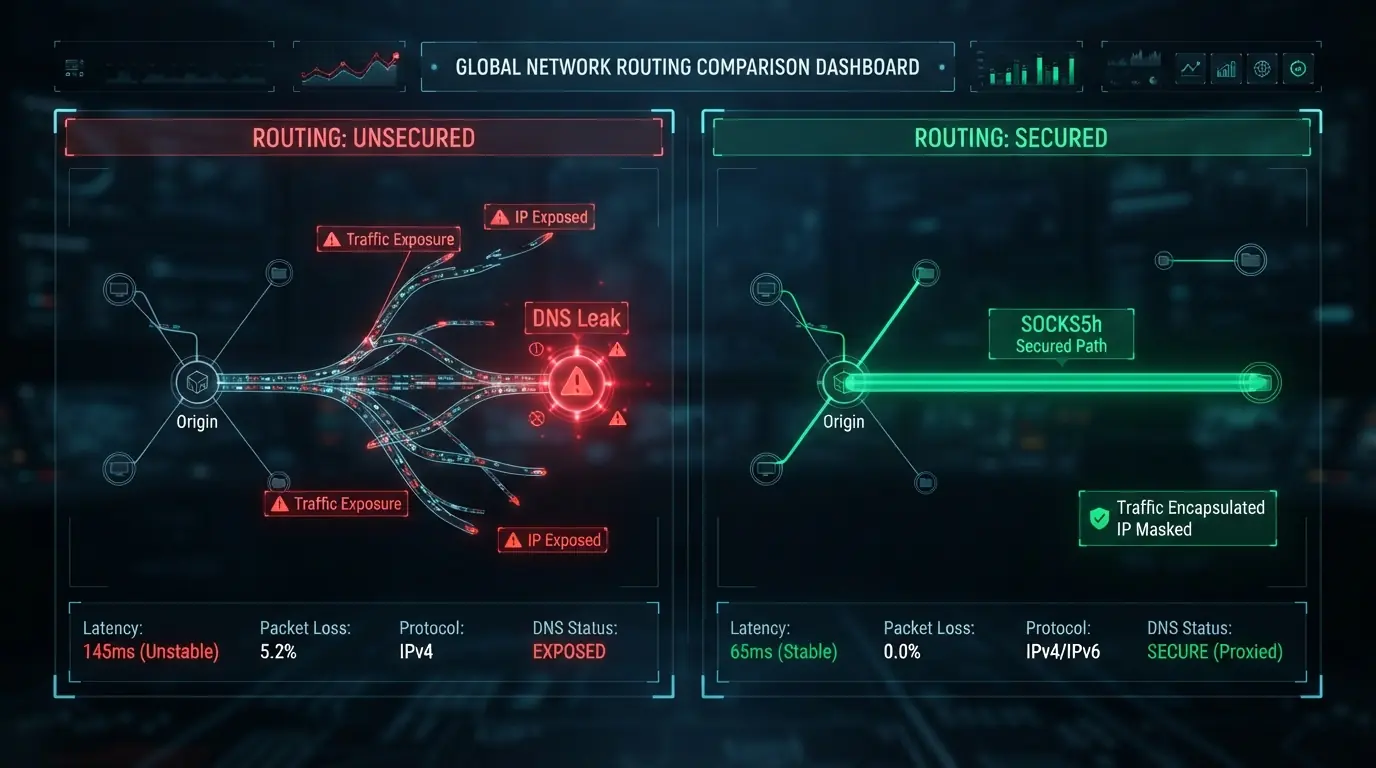
Is SOCKS5 the gold standard of anonymity and reliable protection? Despite SOCKS5 having advantages over SOCKS4 and HTTP, the mere word SOCKS5 in a proxy address does not guarantee protection against real IP leaks.
In this article, we will explain how SOCKS5 differs from SOCKS5h, why the extra letter in the name is critically important, analyze the network packets of both protocols, and discuss why even SOCKS5h by itself does not save you from de-anonymization.
Many people think that using a proxy with SOCKS5h support is enough to ensure online anonymity. From this article, you will learn why this is not the case, why a single letter in the proxy address can lead to irreparable consequences by exposing your IP address, and most importantly — how to protect your data from leaks via DNS, WebRTC, and ECS.
Table of Contents
Differences between SOCKS5 and SOCKS5h
SOCKS5: Client-side resolving
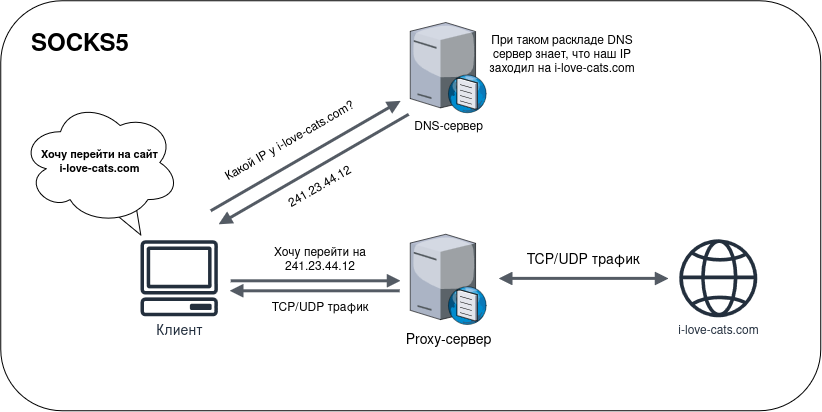
When you use standard SOCKS5, the domain name is resolved directly on your computer. It sounds innocent, but those who follow our posts will immediately see a serious problem.
Imagine the following chain. You open your browser, enter the address example.com, and press Enter. At this point, the browser doesn't know where this website is located — it needs to find out its IP address. The browser sends a DNS query to your local DNS server (usually your ISP's server or a public resolver like Google's). Then the DNS server responds: here is the IP address for this domain - 93.184.216.34. Only after that does the browser pass this exact IP address to your SOCKS5 proxy, saying: "Connect to this address and give me the response." The proxy makes the connection and returns the traffic to you.
Important
But there is a problem. First, your ISP sees that you requested a DNS resolution for the example.com domain, even if the web traffic itself goes through the proxy. Second, if you use your ISP's DNS servers for resolving, it can directly reveal your real location through a DNS leak. Also, for an anti-fraud system, this is a glaring red flag: "This is clearly a proxy because the IP is one thing, but the DNS server is in a completely different place."
SOCKS5h: The letter "h" changes everything, but not completely...
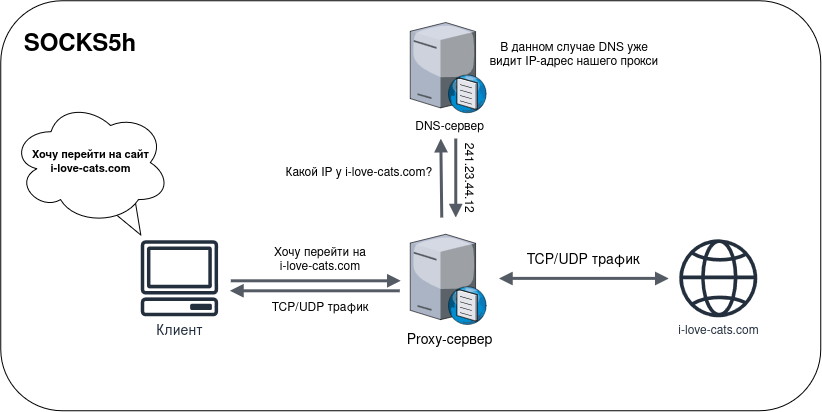
The letter h in the SOCKS5h name stands for hostname. Here, the sending of DNS queries works differently.
When you use SOCKS5h, the browser does not try to find out the domain's IP address on its own. Instead, it simply passes the domain name itself to the proxy server, saying: "Look, I need to connect to example.com, but I don't know its IP. You figure it out." The proxy server performs the DNS query itself, finds out the IP address, and then connects to the target server. Your browser receives the traffic, but the entire resolving process remains on the proxy side. At the same time, your local DNS server and your ISP no longer see which domains you are accessing.
Is this really the case?
Let's see how this works at the packet level. We will make requests through SOCKS5 and SOCKS5h and see what data flies across our network. To do this, we will use the tshark utility to confirm the presence of a DNS query with SOCKS5, and the Wireshark utility — a graphical version of tshark for convenient packet analysis. Let's get started.
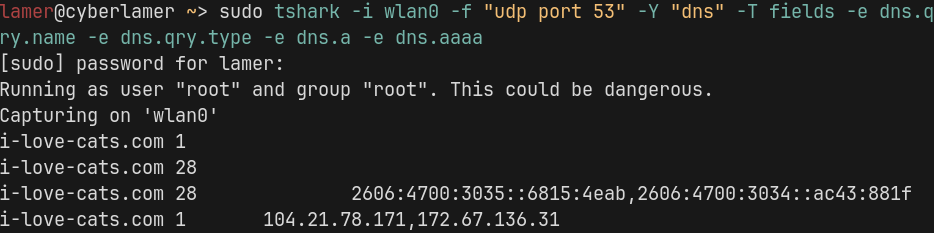
Let's run tshark with the following command to catch the DNS packets that our computer sends:
sudo tshark -i wlan0 -f "udp port 53" -Y "dns" -T fields -e dns.qry.name -e dns.qry.type -e dns.a -e dns.aaaaThen we'll send a request to the i-love-cats.com website through our proxy server using the curl utility with SOCKS5:
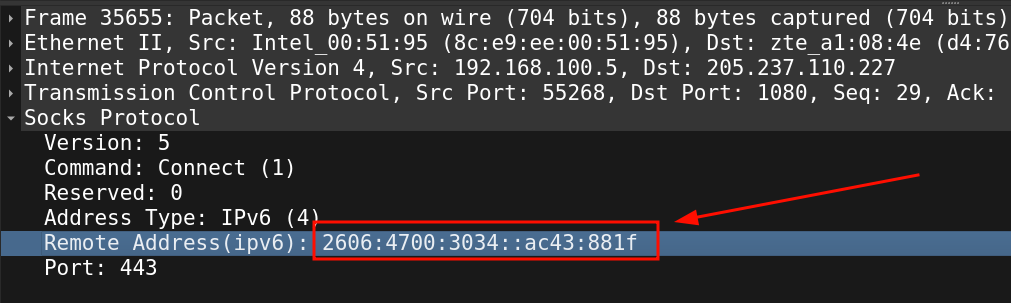
curl --proxy socks5://login:password@ip:port https://i-love-cats.comLet's look at the tshark output, and we will see that a DNS query was indeed sent to obtain the IP address of the i-love-cats.com website. Note the IPv6 address 2606:4700:3035::6815:4eab,2606:4700:3034::ac43:881f. Let's remember it.
Let's check with the Wireshark utility to see what our traffic looked like. We will find our packet. The 4 requests prior to it were for establishing the connection and authenticating the user on the proxy server. In the packet itself, we see the very same IPv6 address that tshark showed us.

From this, we conclude that the DNS query was indeed sent from our PC.
What about SOCKS5h? Let's send a request through the same proxy via curl, but this time specifying socks5h:
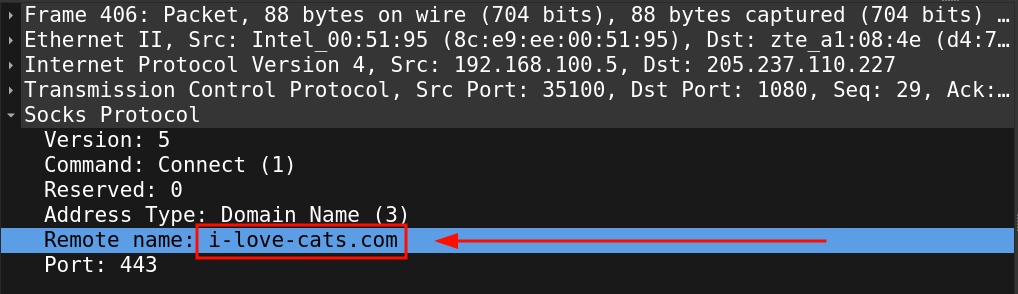
curl --proxy socks5h://login:password@ip:port https://i-love-cats.comThe tshark output is empty; the DNS query was not sent. Let's check Wireshark. We will find our packet and look at its contents. We can see that our client sent the domain name of the resource we want to visit directly.
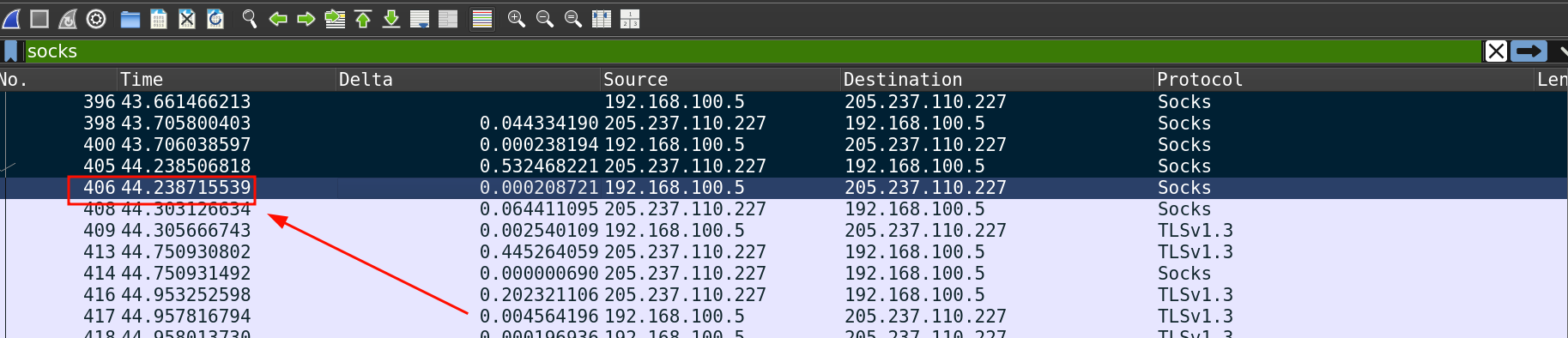
This means that no one's DNS server saw our real IP.
Problems that SOCKS5h doesn't solve
At this point, the conclusion is obvious. SOCKS5h is clearly better than SOCKS5 for anonymity, and if you are still using just SOCKS5, we highly recommend switching to SOCKS5h. To do this, simply replace socks5:// with socks5h:// in your proxy address string, provided, of course, that your proxy provider supports SOCKS5h.
But that is only half the story. SOCKS5h solves the problem of DNS leaks, but there are two more serious vulnerabilities that it does not touch at all. And we will talk about them next.

Problem #1. WebRTC bypasses SOCKS5h
Warning
SOCKS5h does not affect the operation of WebRTC in any way.
This technology uses its own mechanism for establishing connections via UDP and can obtain information about network interfaces directly, bypassing browser proxy settings. If your proxy does not support UDP, the website can consequently discover the user's real public or local IP address via WebRTC. We wrote more about this in our article on How to test a proxy for DNS and WebRTC leaks.
Problem #2. DNS leaks in anti-detect browsers and anonymous environments
Even when working in specialized anti-detect browsers, routing DNS to the proxy side does not guarantee protection. If the routes for DNS queries in the system are configured to bypass the virtual network interface or application, the network stack of the anti-detect browser or the system itself can perform its own DNS query directly through the ISP; the network stack of the anti-detect browser or the system itself can perform its own DNS query bypassing the proxy.
Warning
Websites spot such leaks by generating unique subdomains. If a DNS query for resolving such a subdomain comes from your real IP, the tracking system immediately links it to the user. You can read more about this in the article on How to test a proxy for DNS and WebRTC leaks.
Problem #3. The proxy server can send your IP via ECS
The ECS technology, which was discussed in detail in the article How DNS "leaks" your real IP address, was originally created so that users could load content faster by sending your request to the DNS server closest to you.
Warning
If your proxy does not support the SOCKS5h protocol and UDP connections, your DNS queries will bypass it. There are DNS providers that strictly require the presence of ECS. The system itself can automatically insert your IP into such requests. Therefore, if your DNS query goes to such providers bypassing the proxy, they will be able to determine your approximate location.
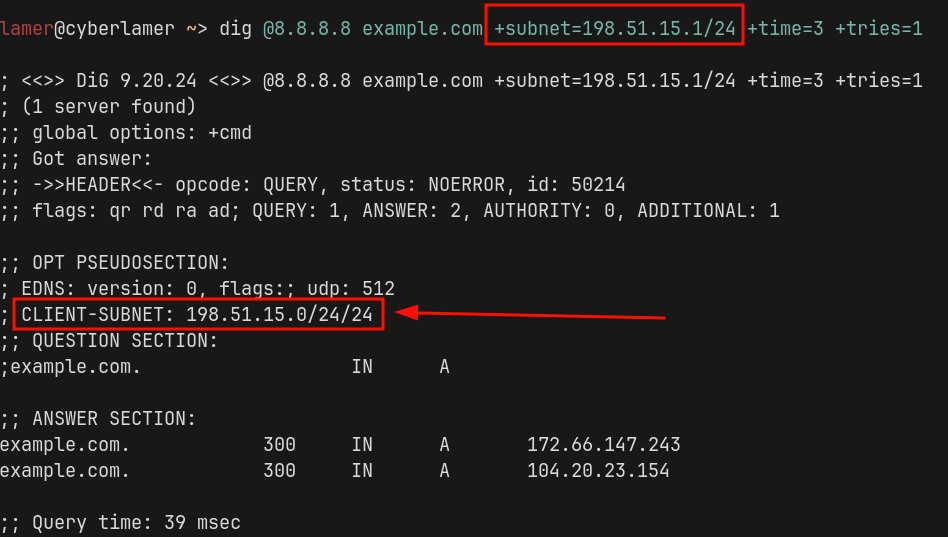
The sent IP address in a DNS query with ECS is truncated by 24 bits from the end, so a malicious provider will not be able to get your full IP address, but your country or even approximate location — quite easily.
Let's test how this works. We send a request with a completely random ECS, for example, 198.51.15.1, and, as we can see, the server receives the request with our IP:
Let's take a look at the AT&T ISP, which discards the ECS we entered and still sends our real IP:
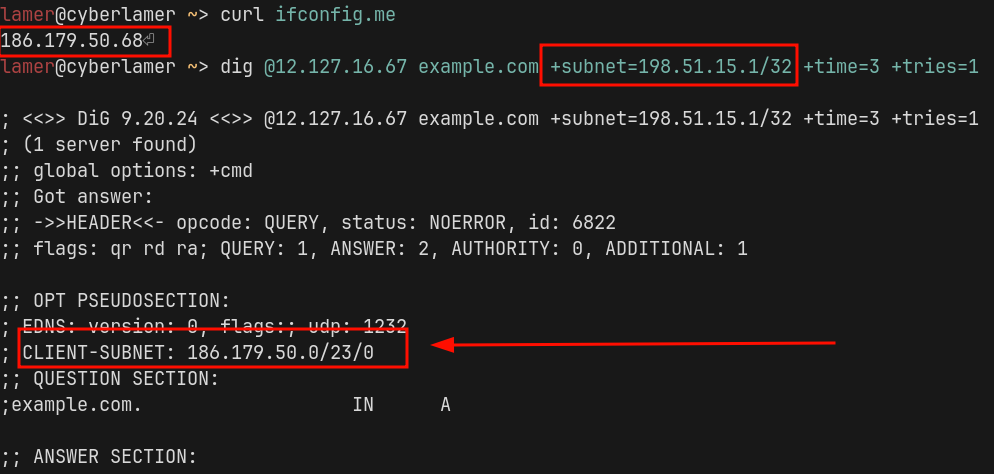
You should be wary of such providers. At the moment, ZloyTeam is actively studying DNS providers and their features to select the safest ones for your anonymity, and soon we will release an update with a more secure DNS configuration, as well as write one of our next articles about it.
Important
It is also possible that some proxy servers might put your IP address in their queries using ECS, instead of their own. This is not seen anywhere in practice, but it's worth noting that it is technically possible.
To prevent leaks, you should abandon public DNS servers that actively use ECS, such as Google or OpenDNS, in favor of ISP or specialized solutions that do not support data transmission in the CLIENT-SUBNET field. We also recommend using ZloyRouter, which supports the automatic ECS spoofing feature for all traffic on your local network "out of the box".
We do not collaborate with proxy providers and do not receive commissions for their sales. This allows us to remain as objective as possible and provide an honest assessment of technologies and solutions.
- ZloyTeam
Conclusion
SOCKS5h is mandatory to use instead of standard SOCKS5, but it is not a panacea. Keep in mind that even a perfectly configured SOCKS5h is vulnerable to WebRTC leaks and system DNS queries. To test your proxy and find out if websites see your real IP address and how anti-fraud systems will react to it, check your connection through our service, Zloy Detect.
To plug the holes in your anonymity, you can either search for information yourself and fix errors in the system, or you can use the ready-made out-of-the-box solution ZloyRouter, which will do everything for you, and not just for your PC, but for your entire local network.
Software from ZloyTeam stands guard over your anonymity. You can find more interesting articles in our Telegram channel. Meanwhile, we will continue doing everything to ensure you remain private online.